Garfunkel Walking
Turn your daily walks into epic journeys

What is Garfunkel Walking?
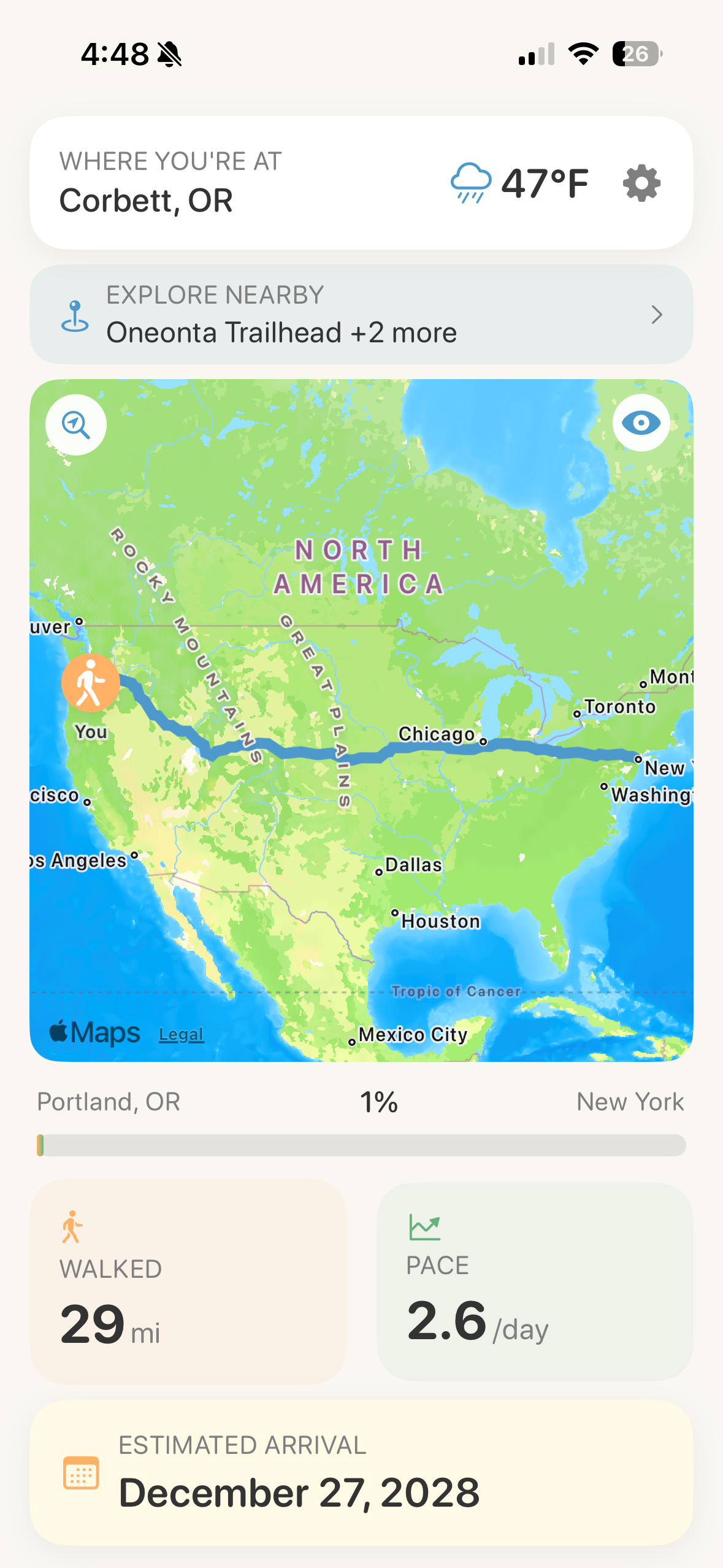
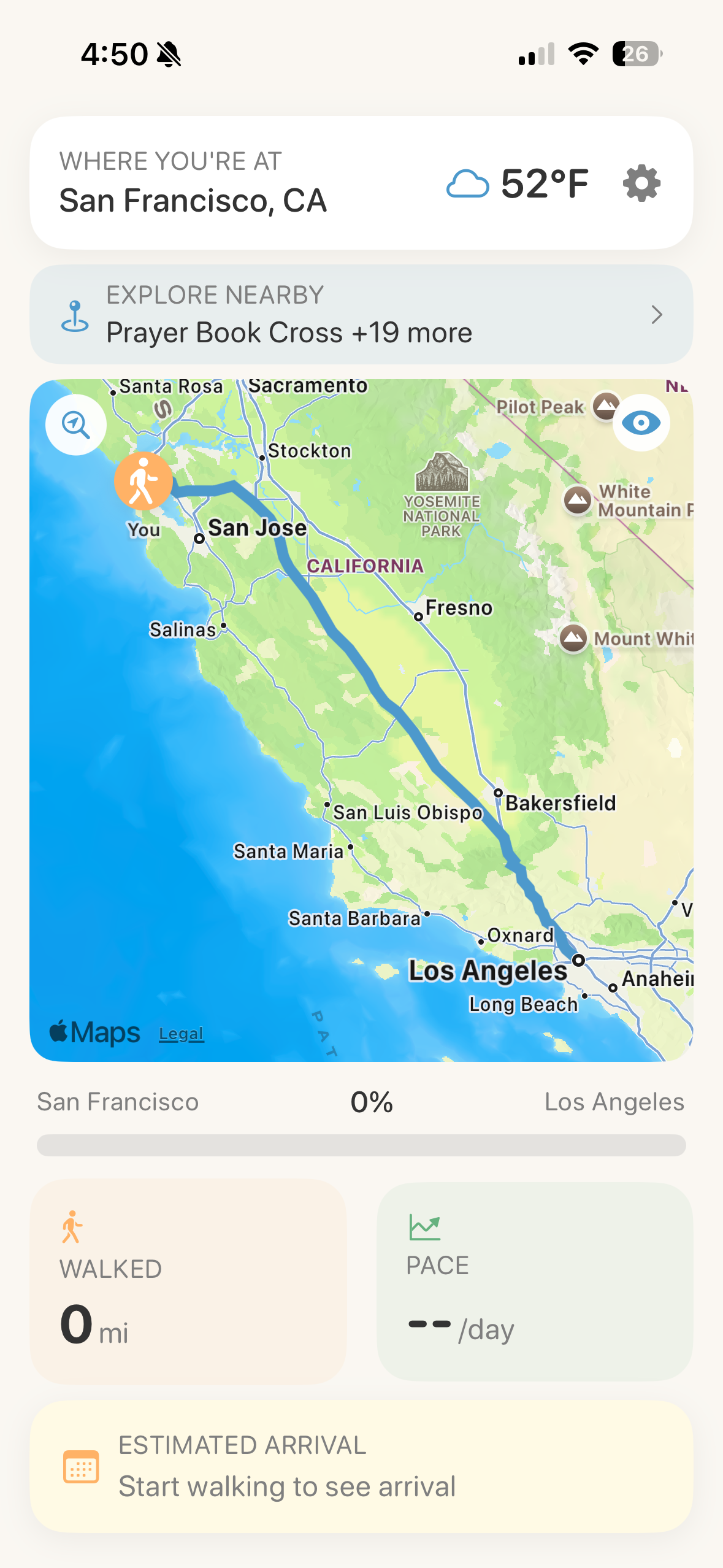
Garfunkel turns your daily walks into epic journeys. Choose any two cities, and the app creates a virtual route between them. As you walk in real life—whether around the block or to the store—your steps move you along your virtual route.
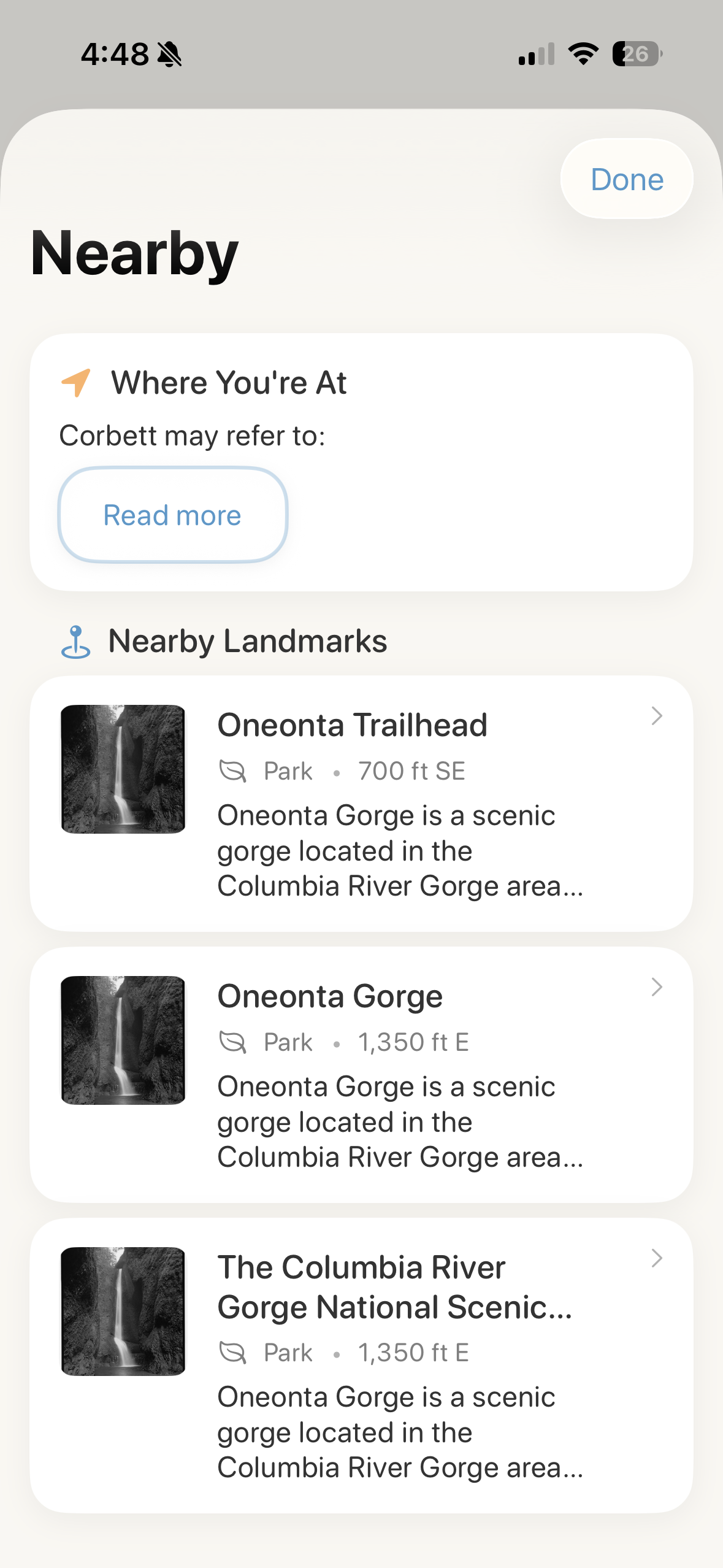
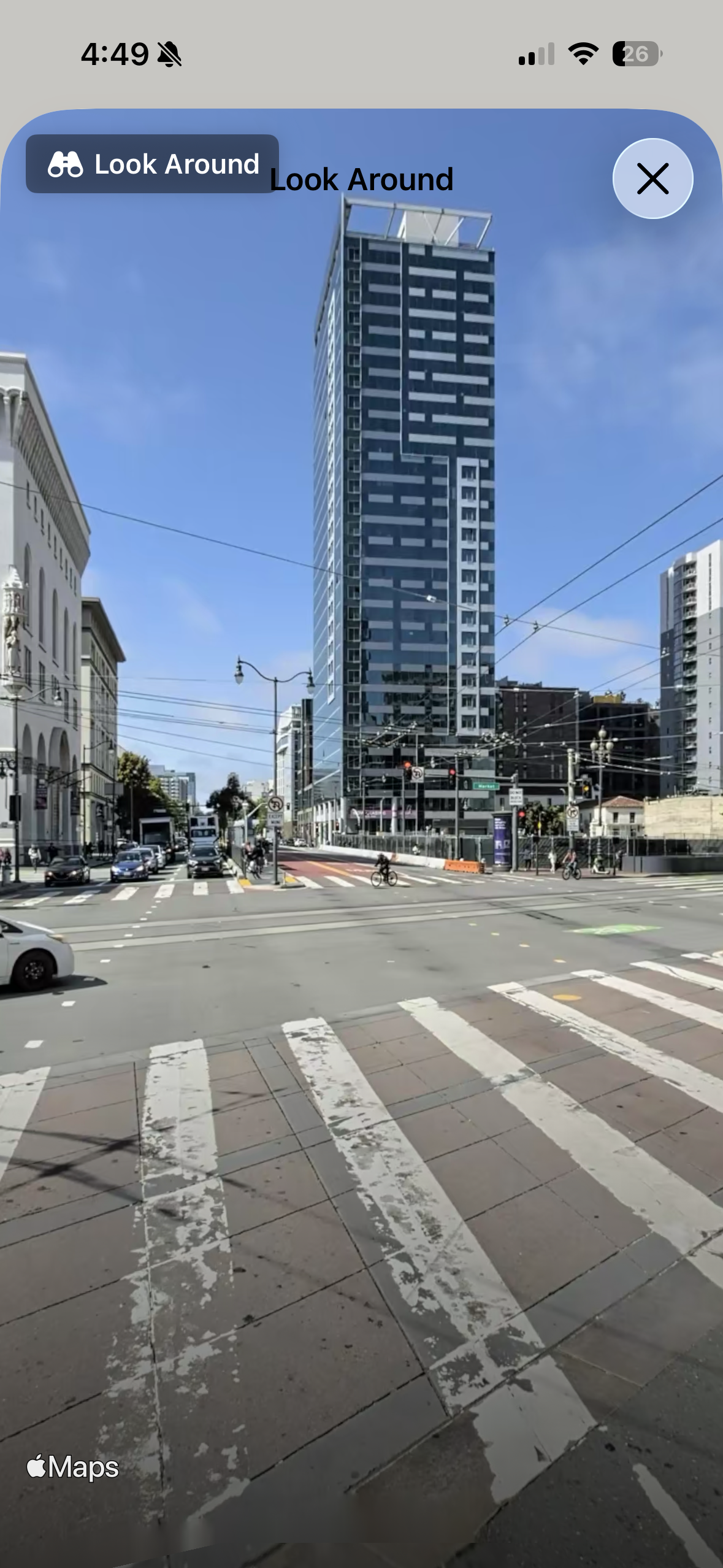
Zoom in to see the streets you're "walking" through, explore nearby landmarks with photos and descriptions, check the weather at your current location, and use Street View to see where you are on your journey.
Features
- Virtual Routes: Set any two cities and watch your daily steps move you along the path
- Health Integration: Automatically tracks your walks using Apple Health
- Explore Along the Way: Discover landmarks, parks, and points of interest as you progress
- Street View: See where you are with Apple Maps Street View
- Weather Updates: Check current conditions at your virtual location
- Multiple Routes: Track multiple journeys simultaneously
- iCloud Sync: Your progress syncs across all your devices
Privacy Policy
Overview
Garfunkel is committed to protecting your privacy. This policy explains what data we collect, how we use it, and your rights regarding your information.
Contact: For privacy questions, email scottholdensmith@gmail.com
What Data We Collect
Health Data (via HealthKit)
- Step count
- Walking distance
- Walking pace
We collect this data solely to calculate your progress along your virtual route and estimate your arrival date. Your health data is read from Apple Health and never transmitted to our servers or shared with third parties.
Route Information
- Origin and destination cities
- Custom waypoints (if you add them)
- Current position on virtual route
- Saved routes and progress
This information is stored on your device and synced via your iCloud account so your routes are available across your devices.
Location Data
- City names for origin/destination points
- Current virtual location name (for weather display)
We do NOT collect or track your real-time GPS location or movement patterns.
Map Data
The app uses Apple Maps to display your route. Map display and street view functionality are subject to Apple's privacy policy. No personal data is transmitted to Apple beyond what's required to display maps.
How We Use Your Data
- HealthKit data: Calculate distance traveled and progress along your route
- Route data: Save your journeys and track progress over time
- Location names: Display maps and relevant weather information
- App usage analytics: Apple's built-in analytics help us understand how the app is used (anonymous, aggregated data only)
Data Storage & Syncing
- Health data is accessed from Apple Health; we do not store copies
- Route data is stored on your device and synced via iCloud
- If you disable iCloud for Garfunkel, route data remains local to your device only
- No data is transmitted to external servers operated by us
Third-Party Services
Apple Maps / MapKit
- Used for displaying routes and street view
- Subject to Apple's privacy policy
Apple Analytics
- We use Apple's built-in App Analytics (opt-in via iOS Settings)
- Provides anonymous, aggregated usage data
- You can disable this in Settings → Privacy → Analytics & Improvements
iCloud
- Route data syncs via your personal iCloud account
- Subject to Apple's privacy policy
- You control iCloud sync in iOS Settings
Data Sharing
We do NOT:
- Sell your data to anyone
- Share your health data with third parties
- Use your data for advertising
- Track your real-world location
We do:
- Use Apple's anonymous analytics to improve the app
- Sync your route data via your personal iCloud (under your control)
Your Rights & Data Control
Access Your Data
- All route data is visible within the app
- Health data remains in Apple Health
Delete Your Data
- Delete individual routes within the app
- Delete the app to remove all local data
- iCloud data: Disable iCloud for Garfunkel in Settings, then delete the app
- Health data: Managed through Apple Health
Revoke Permissions
- HealthKit access: Settings → Privacy & Security → Health → Garfunkel
- iCloud sync: Settings → [Your Name] → iCloud → Garfunkel
Children's Privacy
Garfunkel is suitable for all ages (4+). We do not knowingly collect personal information from children. The app accesses only step count data from Apple Health, which remains on the user's device and is not transmitted to us.
Changes to This Privacy Policy
We may update this policy occasionally. Changes will be posted on this page with an updated "Last Updated" date. Continued use of the app after changes constitutes acceptance of the updated policy.
Support & Help
Need assistance? Email scottholdensmith@gmail.com. We typically respond within 48 hours.
How Garfunkel Works
Garfunkel turns your daily walks into epic journeys. Choose any two cities, and the app creates a virtual route between them. As you walk in real life—whether around the block or to the store—your steps move you along your virtual route. Zoom in to see the streets you're "walking" through, explore landmarks, and check the weather at your current location.
Getting Started
- Grant HealthKit permission when prompted
- Set your origin and destination cities
- Start walking! Your progress updates automatically
Frequently Asked Questions
Getting Started
How do I create my first route?
Tap the + button, enter your starting city and destination, and the app will map your route. Your daily steps will automatically move you along the path.
Why isn't my progress updating?
Make sure Garfunkel has permission to access your Health data: Settings → Privacy & Security → Health → Garfunkel. The app reads your step count to calculate progress.
How do I change my destination?
You can create a new route anytime. Each route saves independently, so you can have multiple journeys in progress.
Health Data & Privacy
Why does Garfunkel need access to my Health data?
The app reads your step count and walking distance to calculate how far you've progressed on your virtual journey. This data never leaves your device and is never shared with anyone.
Is my health data private?
Yes. Health data stays in Apple Health on your device. Garfunkel only reads it to calculate your progress—it never uploads, transmits, or shares your health information.
Using the App
How accurate is the estimated arrival date?
The app calculates your estimated arrival based on your recent average daily steps. As your walking patterns change, the estimate adjusts automatically.
Can I have multiple routes at once?
Yes! You can create and track multiple routes simultaneously.
Do my routes sync across devices?
Yes, if you have iCloud enabled. Your routes and progress sync across all your devices signed into the same iCloud account.
Technical Questions
Does it work without internet?
Progress tracking works offline since it only reads from Apple Health. However, map display, street view, and weather require an internet connection.
Will this drain my battery?
No. Garfunkel reads step data from Apple Health, which already runs in the background. The app doesn't track your location or run any battery-intensive processes.
Can I use it on iPad?
No, this is iPhone only.
Troubleshooting
Progress isn't updating
- Check that Garfunkel has Health access: Settings → Privacy & Security → Health → Garfunkel
- Make sure you've walked enough steps to see visible progress on long routes
- Try force-quitting and reopening the app
Can't see maps or street view
- Check your internet connection
- Make sure Location Services is enabled for the app
- Try again in a few moments
Routes not syncing between devices
- Verify iCloud is enabled for Garfunkel in Settings → [Your Name] → iCloud
- Make sure both devices are signed into the same Apple ID
- Check that you have available iCloud storage
App crashes or freezes
- Update to the latest version from the App Store
- Restart your device
- If problems persist, contact support with details about when the crash occurs
Feature Requests & Feedback
Have an idea for Garfunkel? I'd love to hear it! Send suggestions, feedback, or feature requests to scottholdensmith@gmail.com.
If you enjoy using Garfunkel, please consider leaving a review on the App Store—it helps others discover the app.